Agent Gateway
GitHub Copilot, beyond the editor

Your Copilot models.
Your favorite coding agents.

Bring the models available in GitHub Copilot to Claude Code, Codex, Gemini CLI and more—through one gateway inside VS Code.

MIT licensed · Requires signed-in GitHub Copilot Chat.
Keep VS Code open. Your account’s model access and quotas apply.

ONE CONNECTION. MORE POSSIBILITIES.01 / LOCAL
agent-gateway / illustrative session
# Your workspace. Your choice of agent.
❯ claude | codex | gemini
Gateway● Local connection
ProviderGitHub Copilot in VS Code
APIsOpenAI · Anthropic · Gemini

Same models. A different way to build.
❯ What are we making today?
Local bridge. Upstream provider limits still apply.

Supported coding agents.

Automatic setup, guided steps, or manual connection
Claude Code Codex Gemini CLI Oh My Pi Pi Hermes Agent OpenClaw Kilo Code Cline CLI DeepSeek Harness Antigravity CLI Guided steps Cursor Manual · tunnel required

Setup and tool support vary. Gemini CLI and OpenClaw setup are not yet verified with live installs. Cline’s VS Code extension requires manual setup. Other compatible clients can connect using an OpenAI, Anthropic, or Gemini base URL. See agent-by-agent details ↗

Set up your agents
from VS Code.

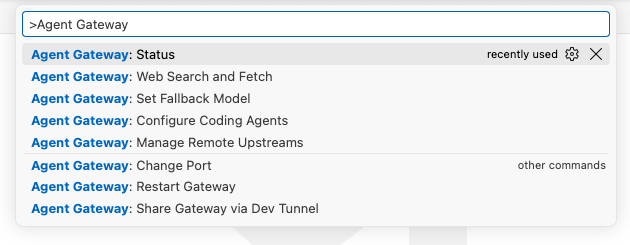
Open the Command Palette with ⇧⌘P on macOS or Ctrl+Shift+P on Windows and Linux. Type Agent Gateway to find status, setup, sharing, and search.

  1. 01
    Install and allow Copilot access

    Install Agent Gateway from the Marketplace. When VS Code asks to let it use Copilot’s language models, choose Allow.

  2. 02
    Check that the gateway is ready

    Click Gateway in the status bar or run Agent Gateway: Status. Confirm that it says Ready.

  3. 03
    Choose your agents and model

    Run Configure Coding Agents, review changes, and confirm. Follow the remaining setup or restart instructions for each agent.

Configuration changes are reviewed before saving, backed up, and reversible through Remove gateway.

Actual VS Code Command Palette listing Agent Gateway commands: Status, Web Search and Fetch, Set Fallback Model, Configure Coding Agents, Manage Remote Upstreams, Change Port, Restart Gateway, and Share Gateway via Dev Tunnel.
PRODUCT SCREENSHOT · Agent Gateway commands in the VS Code Command Palette.

Your Copilot models.
More ways to use them.

Keep the agent’s file edits, shell commands, and MCP tools. The gateway handles the model connection, API translation, and the settings in between.

/ 01   Local or another machine

Share Copilot models
across machines.

Work through the local gateway, or bring models from another machine into the same list. On the host, use Share Gateway via Dev Tunnel. On the other machine, add its URL and key in Manage Remote Upstreams.

Tunnel hosting runs in an extension-managed background process, not an integrated terminal. Use Stop sharing to end it; extension shutdown also stops hosting.

Set a gateway API key before sharing. Anyone with the tunnel URL and key can use the host’s models. Initial devtunnel installation or sign-in may still need an interactive terminal.

HOST MACHINEVS CODE OPEN
Copilot + Agent Gateway

Local models remain available here.
Dev tunnel hosting runs in the background.

AUTHENTICATED DEV TUNNEL
Gateway URL + separate API key
OTHER MACHINEREMOTE ADDED
Your agent, with a wider model list

Remote names use <name>--<model>.
Choose a local or remote model for the task.

Stop sharing whenever you choose.
CONCEPTUAL CONNECTION VIEW · Devices and connection are illustrative; no live status is shown.
/ 02   Search & read the web

Add web search
and page fetching.

Enable supported web search and URL fetch tools through Web Search and Fetch. Pick an engine, add a key if required, and let compatible agents bring web sources into their work.

Choose from Exa, Firecrawl, Tavily, Jina AI, or You.com. Exa and Firecrawl offer rate-limited anonymous search and fetch. Jina AI offers anonymous fetch; Tavily and You.com require keys.

Off by default. Provider limits apply, and tool support varies by API and agent. Search-service keys stay in VS Code secret storage; queries and page text are not logged.

Web Search and FetchTry the provider picker
Choose an engine
Exa · Search and fetch without a key, subject to rate limits.
Illustrative search resultFind the relevant documentation

A source title and citation help connect the answer to the page behind it.

Illustrative fetched pageRead beyond the snippet

Fetch page text for supported URL-reading tools, using the selected engine.

CONCEPTUAL UI · Picker changes this illustration only. No search request is sent; cards are examples, not actual results.
/ 03   Deliberate model routing

Choose your model mappings
and fallback.

Choose your main model in agent setup. If a background task requests a different name, use Set Fallback Model to map that specific name to a compatible local model.

An optional fallback handles unknown model names only for supported APIs. Select a compatible local or remote model explicitly. The default is No fallback; the gateway does not pick one for you.

Fallback is not failover: an error from an existing model does not trigger it. Gemini unknown names use mappings or aliases, not the general fallback rule. AI-assisted mapping suggestions can be reviewed before saving and use Copilot quota.

Model routingTwo different jobs
Specific mapping Explicit rule
requested-namechosen-local-model

Route this name to the model you selected.

Unknown-name fallback Default: off
unknown nameNo fallback

Choose a compatible local or remote model to enable it.

Known model + request error ≠ fallback
Gemini → use mappings or aliases
CONCEPTUAL UI · Generic names illustrate routing semantics, not an available model catalog.
/ 04   See the connection clearly

Copy API URLs.
Inspect request logs.

Open Status to inspect models, remotes, and recent errors. Under API URLs, copy endpoints using your configured port—including Anthropic and Gemini token-count URLs.

Use request IDs to follow failures in the output panel or error log. Remote metadata is labeled with the upstream name, so you can see where a request went without logging the conversation.

Prompts, request bodies, tool arguments, search queries, URLs, page text, and keys are not logged. The sample here uses placeholder metadata—not a real request.

Read the API reference ↗
Status → API URLsDefault local port
OpenAI Responses
http://127.0.0.1:24444/v1/responses
Anthropic token count
http://127.0.0.1:24444/v1/messages/count_tokens
Gemini token count · replace <model>
http://127.0.0.1:24444/v1beta/models/<model>:countTokens
# Illustrative remote request metadata
[remote][workstation] [example-id]
POST /v1/responses model=example-model
status=200

Example URLs only. No gateway is contacted.

CONCEPTUAL UI · Copy controls work. These are default-port examples, not detected endpoints or live logs.

Frequently asked
questions.

Is this another model subscription?

No. Agent Gateway is an MIT open-source VS Code extension, not a model provider. It connects tools to models your signed-in Copilot account can access. Your provider’s quotas and account requirements still apply.

Does VS Code need to stay open?

Yes. The gateway runs inside VS Code. Closing it stops the local service; shutting down the extension also stops its tunnel hosting. There is no separate gateway server to deploy.

Does my code stay on my computer?

The gateway listens on loopback by default, but model requests still go to the provider that serves the selected model. Remote gateways and optional web tools introduce the services you choose. Prompts and keys are not logged; agent settings and backups may contain a gateway key and should be treated as sensitive.

Will every agent feature work?

No. Your agent’s own edits, shell commands, and MCP tools stay with the agent. Provider-hosted features vary: supported search and fetch tools can run through the gateway, but hosted code execution and some other server tools are not supported. Check tool support ↗

Can I undo the setup?

Yes. Use Configure Coding Agents → Remove gateway to revert the gateway’s entries. Changed files have backups. You can also disable the gateway without uninstalling it by setting agentGateway.enabled to false.

Make room for your workflow.

Open source. Yours to inspect, adapt, and use.

Get Agent Gateway